IDE Nostalgia
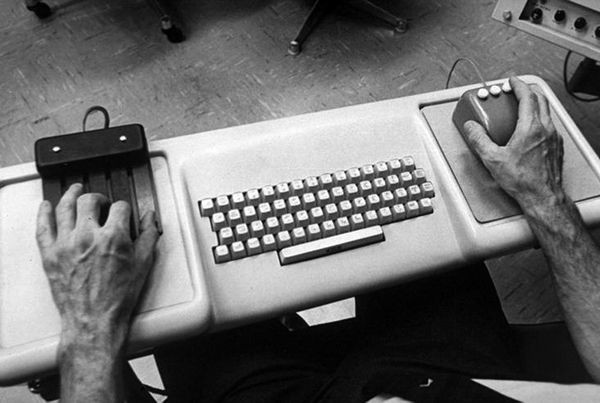
The 150 year old device that made a 50 year old Integrated Development Environment (IDE) rock
Photograph © Mark Richards courtesy of Computer History Museum
I have been coding for more than 50 years. I am retired now, but still enjoy coding and learning. I have programmed for mainframes, 8-bit CPUs, home computers, servers, mobile devices, and modern development laptops. I have used more than 30 different programming languages professionally. Fifty years ago I was using one of the best, most fluid code editors I have ever used. This was the NLS (oNline System) in Doug Engelbart's Augmentation Research Center at Stanford Research Institute in Menlo Park, California in 1972. NLS was running on a 1 MHz PDP-10 with 1 MB of memory (real + virtual combined). How is it possible that a fifty year old software system was, in many ways, a faster, more efficient code editor than what I can find today? It was made possible by the visionary genius of Doug Engelbart and the high-performance user interface that he and his team built.
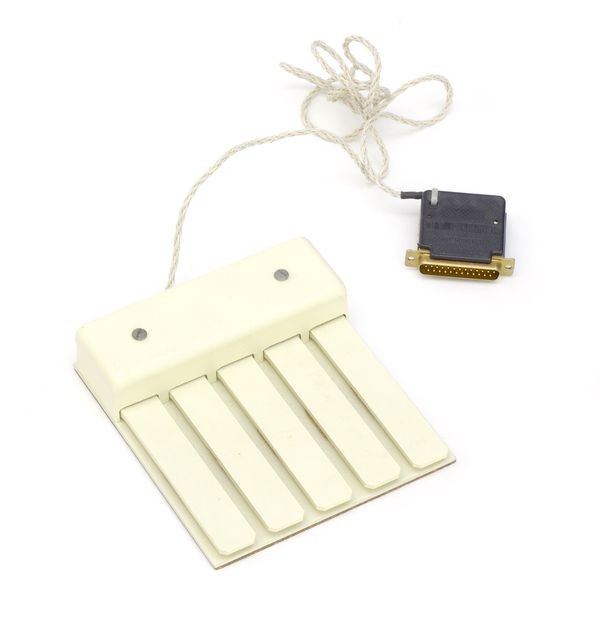
One of the key innovations that enabled this performance was the use of a mouse and keyset together to control the user interface. Doug and William K. English invented the mouse and re-invented the keyset. SRI applied for patents on both the mouse and the keyset. They received a patent on the mouse and found out that the keyset was patented in the 1860s as a telegraph input device. The keyset is a five-key keyboard on which the user plays keys and/or chords to type commands to the modal user interface: "c" for copy, "d" for delete, "i" for insert, etc.
The keyset was not intended to replace the keyboard, since it is much faster to type continuous prose with both hands on a keyboard. Touch typists utilize muscle memory to minimize the mental focus needed for text entry. Touch typing on the keyset (chording) while mousing enabled that same kind of muscle memory for simple edits, short command entries, and exploring a hyper-linked information space. You never had to take your eyes off the dynamic view of the information space. NLS was used to edit its own hyper-linked source code—inventing software bootstrapping in the 1960s. NLS demonstrated that text editing is remarkably efficient with one hand on a keyset and the other on a mouse.
The major attributes of NLS that contributed to its efficiency as a code editor were:
- Consistent Verb > Noun command structure:
- Verbs: copy, insert, delete, jump, transpose, etc.
- Nouns: word, statement, branch, link, group, etc.
- Keyset: enter command verbs (chord 'c' for Copy, then 's' for Statement, or 'j' for Jump, 'l' for Link)
- Mouse: point at nouns and target locations
- Number of selections determined by command type:
- Copy takes two selections (source and destination)
- Delete and Jump take one click
- Selection is optimized for the noun type:
- Branch and Link take one click
- Text and Group take two clicks
- Number of selections determined by command type:
- Strictly hierarchical file system
- Viewspecs: keyset commands to fold, filter, and expand hierarchical views of files on the fly.
As a system programmer on the NLS system, I used NLS to explore and edit the NLS source files. Doug was a big believer in bootstrapping, so from the beginning, the first "knowledge workers" to be augmented by NLS were the programmers creating NLS.
Image courtesy of SRI International © SRI International
Using this setup, I explored all of the NLS source code and how it was interconnected without ever touching the typewriter keyboard. If conditions were right—namely late at night when the load average on the PDP-10 was under 2—flying through the information space of the NLS system was almost magical. It was as if the coefficient of sliding friction between the text and the display was zero.
If, for example, I wanted to add a new command to the system, I would start by finding the source for an existing command that was most similar to the proposed command. I could filter my view of this file using viewspecs. This was done by holding down a mouse button and typing a viewspec chord on the keyset. Viewspec 'x' gave you only the top level of the hierarchy and only one line of text for each statement, so I would immediately see an outline list of all procedures in the file. I would find the procedure I wanted and chord cb on the keyset ("Copy Branch"). The command feedback prompted "Copy Branch from:"—I selected the procedure, the prompt changed to "To:", and I clicked the target location. The prompt showed "OK?", and a single mouse click completed the copy.
Next, I chorded rw on the keyset ("Replace Word"), clicked the procedure name in the newly copied branch, and typed the new command name. This entire sequence took less than two seconds, and I never had to take my visual focus off the source code. I never had to move the mouse to a menu bar or context menu. Keeping focus on the code allowed engineers to stay "in the flow" far longer.
NLS Viewspec Commands: Dynamic View & Outline Control
Viewspecs (View Specifications) were single-character display control parameters in NLS/AUGMENT. They allowed users to instantly change how text and hierarchy were filtered, formatted, and level-clipped on screen without modifying underlying file content.
In NLS, holding down combinations of mouse buttons while playing chords on the 5-key keyset acted like shift states:
- Case 0 (
000mouse buttons): Lowercase letters (Standard viewspec commands) - Case 1 (
010mouse buttons): Uppercase letters - Case 2 (
100mouse buttons): Numbers & special characters - Case 3 (
110mouse buttons): Viewspes
Below is the complete NLS Viewspec lookup table mapping 5-key chord combinations (X = pressed key, 0 = unpressed key), mouse button shift cases, and their corresponding display actions:
| 5-Key Chord | Case 0 (000) |
Case 1 (010) |
Case 2 (100) |
Viewspec Action / Description |
|---|---|---|---|---|
0 0 0 0 X |
a |
A |
! |
Show one level less |
0 0 0 X 0 |
b |
B |
" |
Show one level deeper |
0 0 0 X X |
c |
C |
# |
Show all levels |
0 0 X 0 0 |
d |
D |
$ |
Show top level only |
0 0 X 0 X |
e |
E |
% |
Current statement level |
0 0 X X 0 |
f |
F |
& |
Recreate display |
0 0 X X X |
g |
G |
' |
Branch show only |
0 X 0 0 0 |
h |
H |
( |
g off |
0 X 0 0 X |
i |
I |
) |
Show content passed |
0 X 0 X 0 |
j |
J |
@ |
i or k off |
0 X 0 X X |
k |
K |
+ |
Show content failed |
0 X X 0 0 |
l |
L |
- |
Show plex only |
0 X X 0 X |
m |
M |
* |
Show statement numbers |
0 X X X 0 |
n |
N |
/ |
Hide statement numbers |
0 X X X X |
o |
O |
^ |
Frozen statement windows |
X 0 0 0 0 |
p |
P |
0 |
Frozen statement off |
X 0 0 0 X |
q |
Q |
1 |
Show one line less |
X 0 0 X 0 |
r |
R |
2 |
Show one line more |
X 0 0 X X |
s |
S |
3 |
Show all lines |
X 0 X 0 0 |
t |
T |
4 |
First lines only |
X 0 X 0 X |
u |
U |
5 |
Normal refresh display |
X 0 X X 0 |
v |
V |
6 |
Inhibit refresh display |
X 0 X X X |
w |
W |
7 |
All lines, all levels |
X X 0 0 0 |
x |
X |
8 |
One line, one level |
X X 0 0 X |
y |
Y |
9 |
Blank lines on |
X X 0 X 0 |
z |
Z |
= |
Blank lines off |
X X 0 X X |
, |
< |
[ |
(none) |
X X X 0 0 |
. |
> |
] |
(none) |
X X X 0 X |
; |
: |
_ |
(none) |
X X X X 0 |
? |
\ |
ALT | Center dot |
X X X X X |
SP | TAB | CR | (none) |
Because viewspecs could be chorded on the keyset while selecting objects with the mouse, viewspecs transformed the NLS editor into an interactive, multi-dimensional view engine.
Keyset Learning Curve: A Barrier to Entry
In order to become an expert NLS user, one had to learn how to chord commands (characters) on the keyset. This was not that hard—much easier than learning to touch type on a QWERTY keyboard. It took me about two days to become a proficient keyset touch typist. In fact, I became a one-handed touch typist long before I became a two-handed touch typist.
It saddens me that this initial learning curve proved to be a major barrier to commercial adoption. As Engelbart once put it: "Steve Jobs did a user study and found out it was easier to learn how to ride a tricycle than a 10-speed bike, and declared that therefore all people should ride tricycles." There should be a keyset under your left hand anytime there is a mouse under your right hand!
The chording on the keyset used a binary encoding to map 5 keys to 31 character codes. This binary encoding made it easy to learn the keyset if you were familiar with binary arithmetic. If you knew the chord for 'x', then 'y' was simply 'x' + 1.
Keyset: Necessary but Not Sufficient for a High Performance Editor UI
The keyset was not the only, nor even the most innovative, of the visionary concepts in NLS. All features of NLS supported Engelbart's goal of augmenting collective human intellect—focusing on making the user more powerful rather than simply making the system easiest for beginners.
If you haven't seen the video of Engelbart's 1968 demonstration, check out The Mother of All Demos. You might be surprised by how blurry the display terminals appear. This demo happened in 1968! Computers were mainframes that read punched cards and printed fanfold paper. There were no character terminals, so Engelbart's group built workstation displays by routing a hardware character generator to an oscilloscope and pointing a closed-circuit TV camera at the screen to stream to a TV monitor.
Here is a list from Wikipedia of the NLS innovations over the years:
- The computer mouse
- 2-dimensional display editing
- In-file object addressing and hyper-linking
- Hypermedia & outline processing
- Flexible view control (Viewspecs)
- Multiple windows
- Cross-file editing
- Integrated hypermedia email & publishing
- Document version control
- Shared-screen teleconferencing & computer-aided meetings
- Formatting directives & context-sensitive help
- Compilable "Command Meta Language" & RPC protocols
"Talent hits a target no one else can hit; Genius hits a target no one else can see." - Arthur Schopenhauer. Doug Engelbart was a visionary and a genius. His mouse patent, granted in 1967, expired after 17 years in 1984—the year Apple shipped the first Macintosh.
The Keyset Takes a Side Trip to Xerox PARC
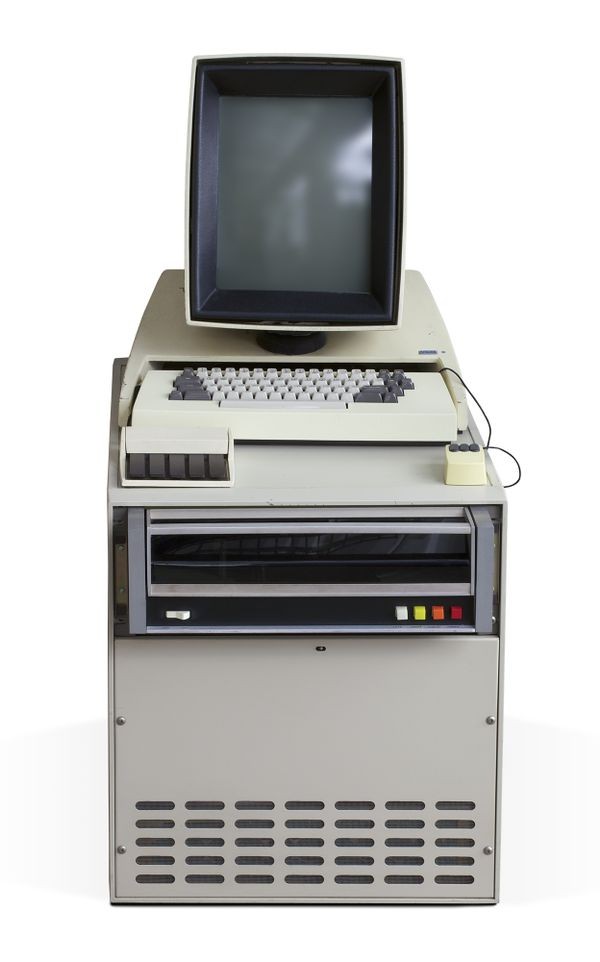
Courtesy of Computer History Museum © Mark Richards
When Chuck Thacker designed the Alto computer at Xerox PARC—the computer with a bitmapped display and a local area network—he included both a mouse and a chorded keyset. This was largely due to the software engineers who moved from SRI to Xerox PARC as NLS funding declined, including William English (co-inventor of the mouse), Bill Duvall, Donald (Smokey) Wallace, Charles Irby, James White, and Larry Garlick.
However, most software written for the Alto used only the mouse. This stemmed from a shift toward emulating paper—making WYSIWYG ("What You See Is What You Get") the dominant paradigm rather than Engelbart's vision of dynamic hyper-linked knowledge spaces. Ironically, this paper-emulation paradigm escaped PARC to Apple via Steve Jobs and to Microsoft via Charles Simonyi. The program that generated the most keyset usage at Xerox PARC was actually a port of Maze War to the Alto!

Courtesy of DigiBarn Computer Museum (contributed by Dan Croghan)
Back to the Future?
I write about the keyset because its importance is often overlooked when people discuss Engelbart's work. It would be entirely possible to write a modal editor plugin for VS Code that implements the NLS verb-noun matrix and viewspec filters. There are modern one-handed chorded input devices, though none as simple and elegant as the original keyset. One could easily 3D-print a 5-key chord pad with a Raspberry Pi Pico or USB microcontroller.
If we could convince programmers to invest two days in mastering keyset chording and verb-noun editing, their editing productivity and focus would increase dramatically. While I might be retired, if an ambitious developer wants to pick up this gauntlet, there is tremendous potential in extending Doug Engelbart's unfinished revolution.
Further Interests
- Doug Engelbart Institute: Explore the legacy, archives, and ongoing vision for augmenting collective human intellect.
- The Mother of All Demos (Highlights Video): Watch the 1968 public demonstration that introduced the mouse, hypertext, dynamic viewspecs, and collaborative real-time editing to the world.